Re-using a single map element for multiple images
Testing shows that re-using a single map element for multiple issues will result in an illogical focus order
Despite the fact that the HTML 5 spec says "a map element (and its area elements) can be associated with multiple img and object elements...", testing shows that this creates a confusing experience for keyboard only users as well as iOS/VoiceOver users.
Implementation
- A single
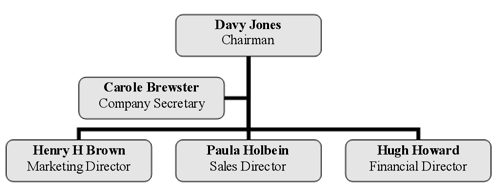
<map>element is used for two images. Both images referenc the same mapidin theuserefattribute - Redundant text links are provided below each image for iOS/Safari/VoiceOver

- Davy Jones: Chairman
- Carole Brewster: Company Secretary
- Harry H Brown: Marketing Director
- Paula Holbein: Sales Director
- Hugh Howard: Finance Director
Lorem ipsum dolor sit amet, consectetur adipiscing elit, sed do eiusmod tempor incididunt ut labore et dolore magna aliqua. Ut enim ad minim veniam, quis nostrud exercitation ullamco laboris nisi ut aliquip ex ea commodo consequat. Duis aute irure dolor in reprehenderit in voluptate velit esse cillum dolore eu fugiat nulla pariatur. Excepteur sint occaecat cupidatat non proident, sunt in culpa qui officia deserunt mollit anim id est laborum.
Focus Order Testing
| OS | Browser | Engine | Results |
|---|---|---|---|
| Windows 7 | IE 11 | Trident | Focus order is logical |
| Windows 7 | FireFox 56 | Gecko | Focus order is not logical. Focus goes from the first set of redundant links, the second image, to the second set of redundant links, then finally to the first image |
| Windows 7 | Chrome 63 | Blink |
Focus order is not logical. Although the map element beign re-used comes before the first set of links of redundant links in the DOM order, focus does not go to the interactive areas of the first image as expected. Only after the last link in the first set of redundant links is blurred, does focus go to the interactive elements of the first image. The interacive elements of the second element do not receive focus but the second set of redundant links does.
|
| iOS 11.2 | Safari | Mobile Webkit with VoiceOver | The interactive areas of both images cannot be swiped to. Only the interactive areas of the first image respond to touch. Both set of redundant links can be swiped to and activated in logical order. |